Header
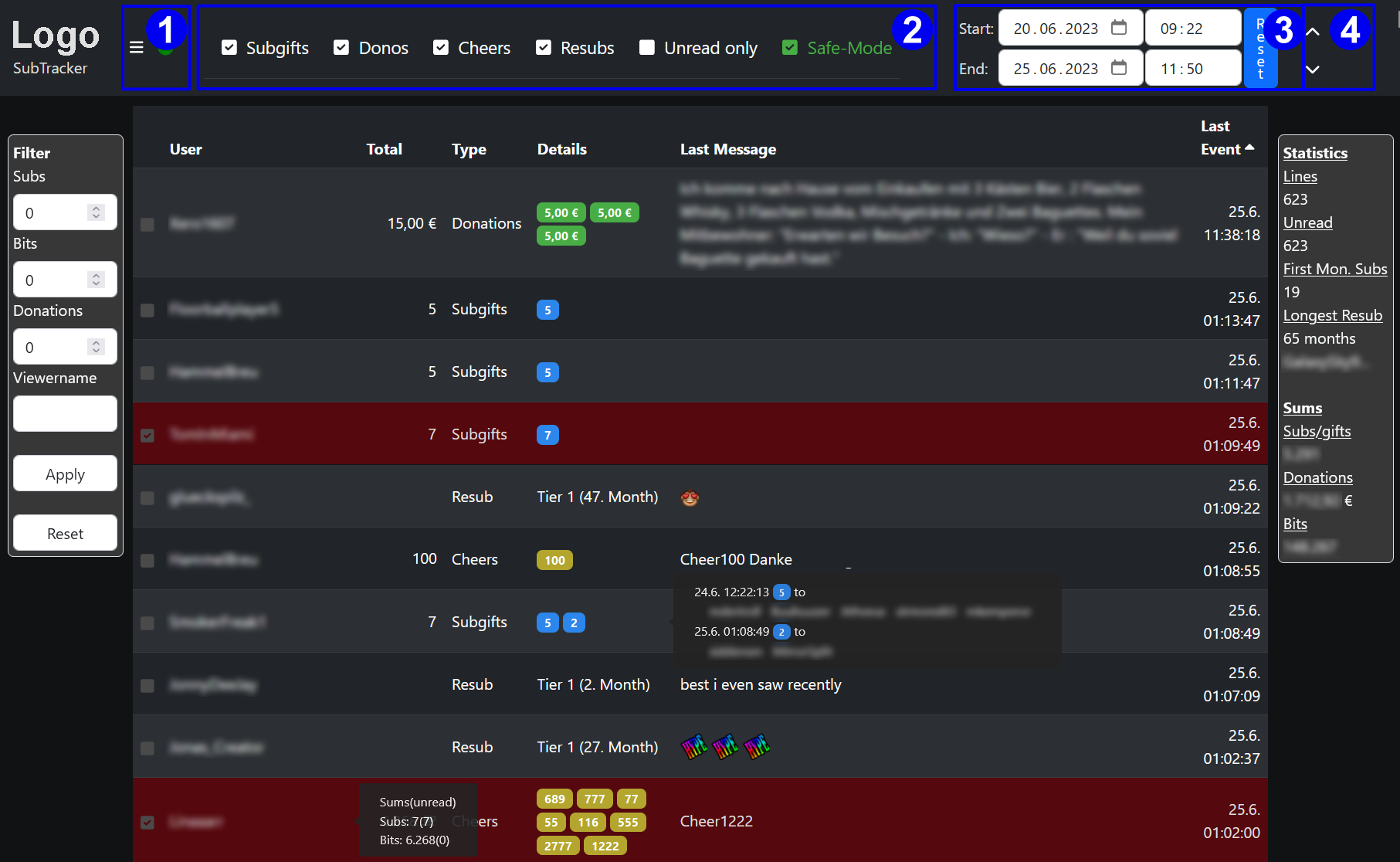
The header area is mainly used to select what is displayed in the table below
-
Menu Button
Here you can open the Main Menu
The colored dot shows the status of all providers connected. See Status indicator -
Selection Area
With the checkmark in this row you can select which type of support to show in the table. With single click you can switch the type on or off. By using a double click you can select this type only (if this is currently already the only type selected, a double click reactivates all types)
The Safe-Mode checkmark is used to activate/deactivate the read checkmark in front of each table line. For the streamer safe-mode is off by default. For anyone else with the right to mark lines as read safe-mode is active by default and needs to be deactivated before any table line can be marked. -
Date Selection Area
Here you can define the start and end date/time for the lines shown in the table. When opening the subtracker page the starttime is initialized with timestamp of the oldes unread entry in the database. The enddate is empty by default, so every line newer as the starttime is shown and new support coming in is added to the table dynamically.
To view historical data you can change the starttime respectivly. Depending on global settings the endtime is automatically set to prevent overwhelming table sizes. It can than be changed to whatever is needed.
With the reset button you can reset start- and endtime back to the default settings described above. -
Up- / Down-Arrows
This buttons allows to jump to the start or end of the table.