Status Indicator
By hovering over the dot in the top left corner you can see the status of all configured data providers
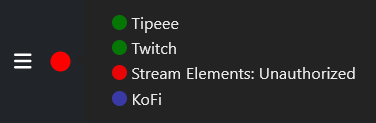
The color of the dot in front of each data provider shows the status of this service:
- Green: The provider is successfully connected.
- Red: There is a problem with the connection. The reason is shown there also. In most cases there is an authentication failure because the connection timed out or the login credentials are invalid.
This mostly happens with Streamelements as they often invalidate the used JSON Web Token (JWT). Users with administration permission will see a menu item in the Main Menu to set a new Streamelements token. - Blue: The provider is configured, but there is no method to detect if the connection is successful. You are on your own, sorry.